Stations, products and reasons · Guide 14 of 14
Technical availability
What technical availability (TA) is, how it is calculated and how to include unplanned stop reasons in its calculation.
On this page
What is technical availability?
The calculation of TA shows the percentage of planned production time without unexpected technical difficulties or maintenance needs.
TA = (Planned Time – Unplanned Technical Stops) / Planned Time
If, for example, your technical availability is at 85%, then you know that 15% of your planned production time is lost due to technical issues that can be resolved by improving maintenance and reliability. Also, by tracking TA, you can give feedback to your maintenance provider on how efficiently they are doing their job.

How to track technical availability?
Before you can analyze TA, you need to define which production stop reasons in your factory are considered as technical difficulties or unexpected maintenance issues.
Choose production stops to be included in technical availability
It is important to keep in mind that you can only include unplanned production stops in the calculation of TA.
-
Go to Settings in Evocon and click on the “Stops” card.
-
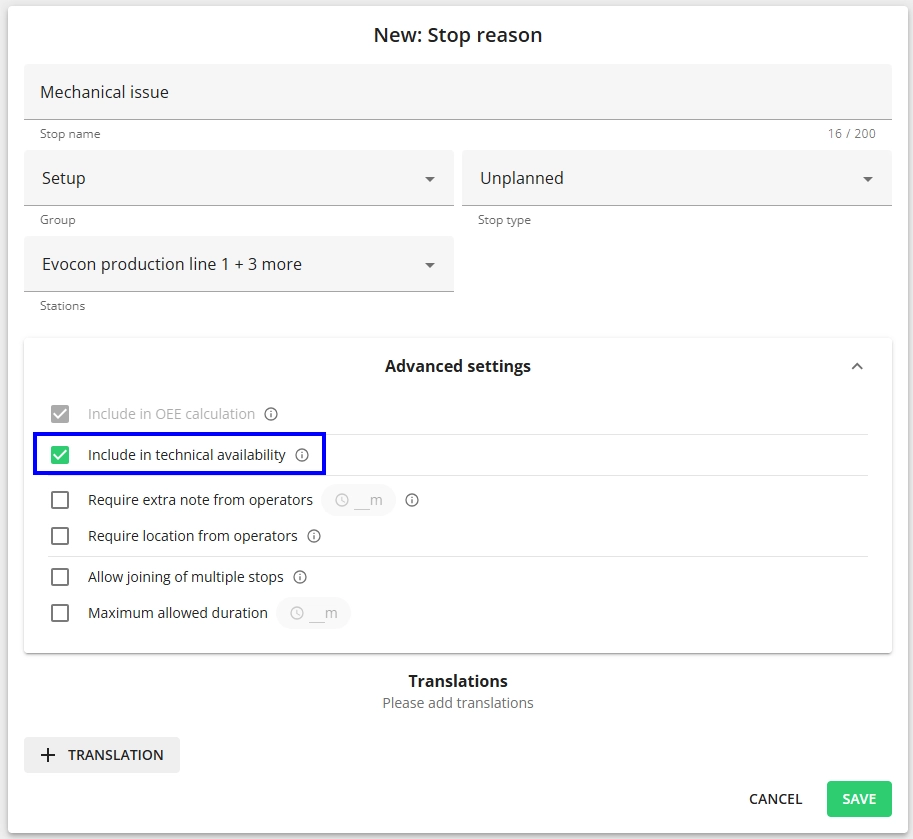
Add a new stop or open the stop that you want to include in the TA calculation for editing.
-
Check the “Include in technical availability”.