Reports and analysis · Guide 15 of 28
Filtering data in reports
The default filters of the standard reports (timeframe, factories, stations, reasons) and how to add, reset and remove filters.
On this page
Filter production data to modify what data is displayed in reports. Filtering is useful because it allows you to focus on a specific dataset (e.g. station groups, stations or factories) or exclude information from your analysis (e.g. certain stop groups or stations).
Also, filters carry over when switching between reports, meaning that you don't have to set the filters again when moving for example from Downtime report to Speed loss report.
What are the default filters?
Common filters for all standard reports

-
Timeframe - selection of the time period for the report, default is "Last 7 days".
-
The other available quick options are today, yesterday, this week, last week, this month, last month, last 30 days, this quarter, last quarter, last 4 quarters, this year and last year. It is also possible to set a custom period from the option "Custom".

-
If you change the timeframe in filters, please check whether it would be useful to change the granularity of the data for better readability on the chart by changing x-axis selection

-
-
Factories - select the factories to be included.
Note: Only available in case there are several factories.
-
Stations - select the stations to be included.
Reason filter
For reasons reports (stops, speed losses, scrap), there is by default also the reason filter:

Stop reason filter is also available in the OEE and Time Usage report.
How to add filters?
It is possible to add filters from the "+FILTER" button
-
the available options can differ per report
-
some options are not shown if not used (for example "Orders" is only shown if production orders integration has been set up)

How to clear/remove filters?
All filtering can be reset from the "RESET" button:

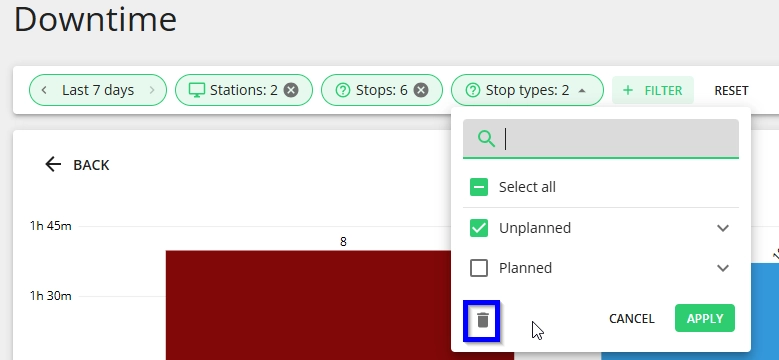
For any added filters (from the "+FILTER" button), it is also possible to remove that filter only and not reset all filters. This can be done from the deleting icon when you open the filter drop-down: