
Support and what's new · Guide 9 of 13
Release Notes 2026
Evocon release notes for January to April 2026: order and LOT/Batch filters, AI downtime note analysis, multi-sample checklists, Checklists widget, production speed report, security settings and more.
On this page
- April
- Orders and LOT/Batch filtering in Reports
- Multi-sample input for Yes/No checklist tasks
- Usability improvements
- March
- AI-powered analysis for downtime extra notes
- Multi-sample checklist task for quality measurements
- Monitor checklist compliance directly from your Dashboard
- Redesigned Shift View header section
- Usability improvements
- February
- Production speed report: validate and optimise your speed targets
- Mr Evocon, proudly Estonian since day one
- Hide less relevant checklists on Shift View
- Mr Evocon goes for gold
- Usability improvements
- January
- Security settings for enterprise-level control
- Pinpoint downtime with Machine Locations
- Improved “Time Remaining” estimates
- Flexible downtime registration in Shift View
- Usability improvements
April
Orders and LOT/Batch filtering in Reports
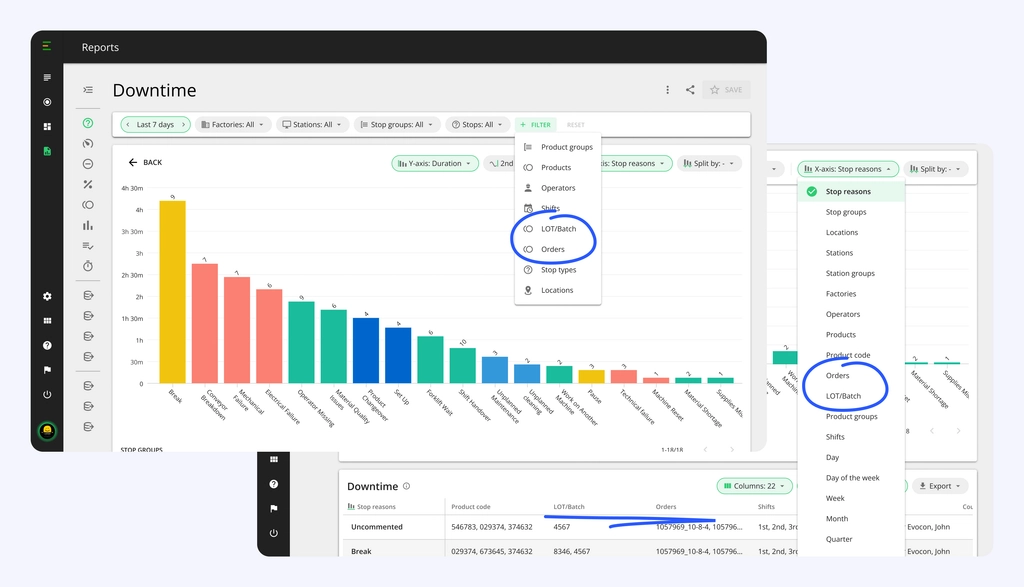
Production orders and LOT/Batch numbers are now available as filters, columns, and x-axis options in Reports, bringing order-level and batch-level analysis directly into Evocon.
Order-based analysis
For clients receiving production orders through an ERP integration, Reports now includes an Orders filter and column. Filter by specific orders, place them on the x-axis to compare OEE, downtime, or scrap across orders, and export the data.
LOT/Batch traceability
LOT/Batch is available as a filter and column across all reports. When a non-conformity surfaces, whether flagged internally or raised by a customer, teams can trace performance back to the specific batch: what stops occurred, how much scrap was logged, and which operators were running the line. This turns Evocon into the first place to look during a quality investigation, not the last.
Multi-sample input for Yes/No checklist tasks
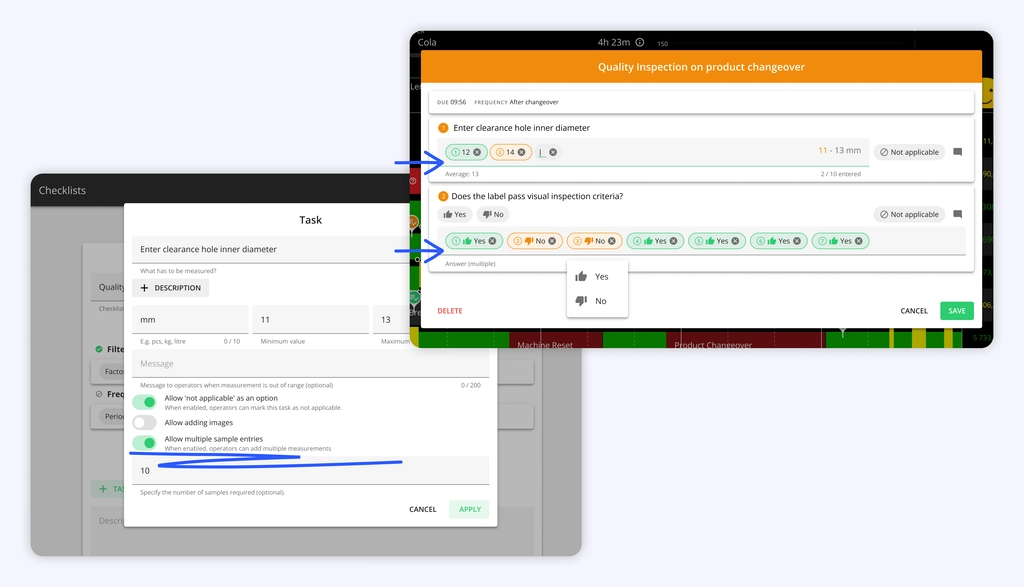
Multi-sample checklists extend to Yes/No task types. Operators record multiple pass/fail checks within a single task, with the system tracking completed samples against the required count.
The required sample count is configured per task in checklist settings, following the same setup as measurement-type multi-sample tasks.
Usability improvements
AlertsApply the machine locations and shift filters to target your alerts more precisely.- Arabic is available as a system language.
SettingsAlerts support filtering by machine location and shift, ensuring you only receive notifications that matter to you.ChecklistsShift start and shift end triggers let you schedule checklists to appear automatically when a shift begins or ends, removing the need to create separate checklists for each shift.
March
AI-powered analysis for downtime extra notes
Reading through hundreds of operator notes to find the root cause of a recurring issue is time-consuming and often results in missed patterns. While individual notes provide clues, the "big picture" usually stays hidden in the notes.
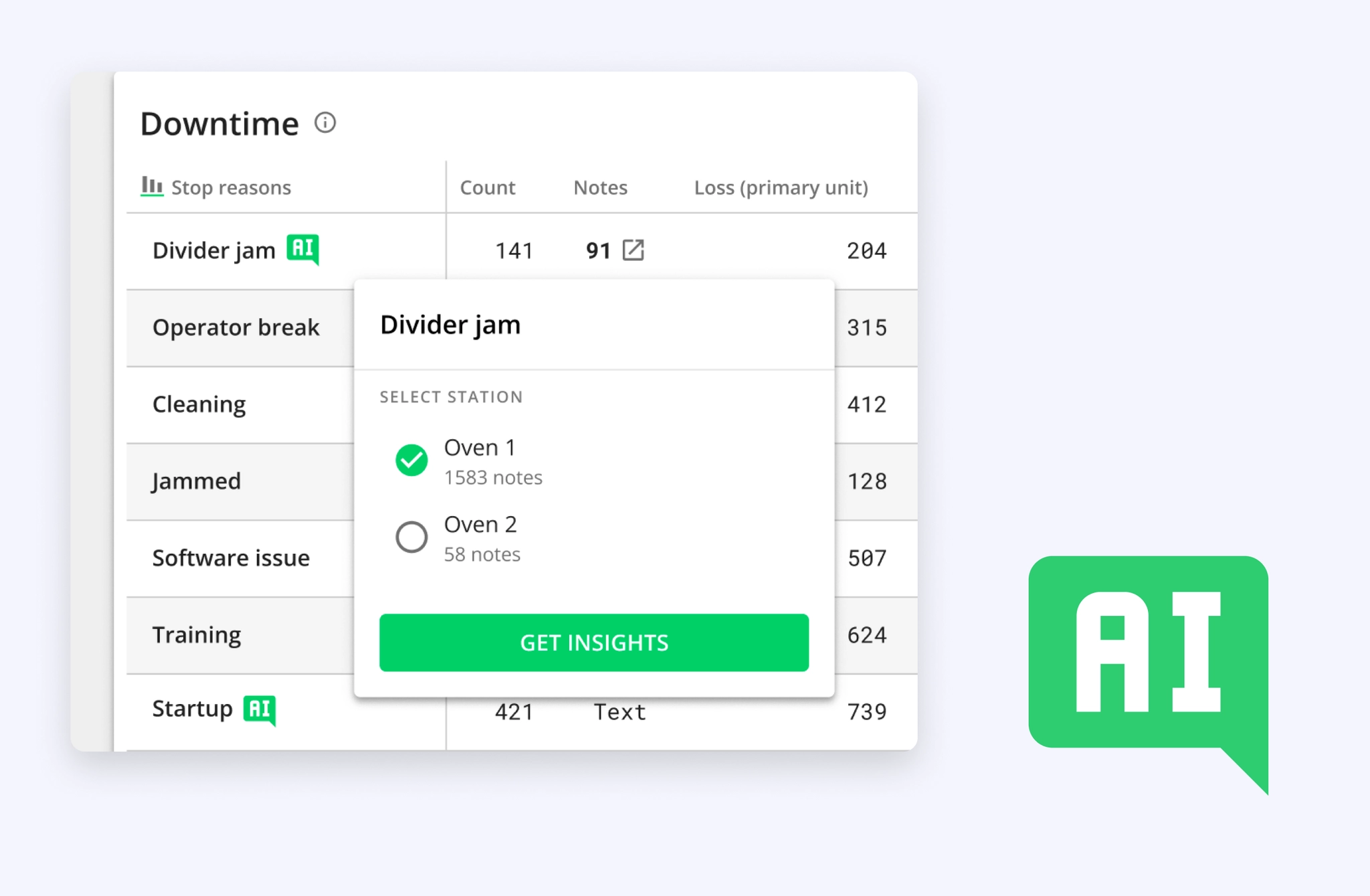
The new AI extra notes analysis turns raw text into actionable insights. By using AI, Evocon now analyzes your downtime notes to identify common themes, calculate their impact, and highlight statistical outliers, all delivered straight to your e-mail inbox as text summary and full .xlsx report.
- Theme clustering: The AI automatically groups similar notes into "Themes," allowing you to see which specific issues are causing the most downtime.
- Pattern recognition: The analysis detects if certain problems are tied to specific shifts, operators, or product groups or locations, surfacing insights that would otherwise stay hidden.
Once the patterns are uncovered, you can streamline your process by adjusting the granularity of your stop reasons to be more accurate or take actions on the shop floor.
To get started, head to the Reports and ensure your x-axis is set to "Stop Reason." Look for the green AI badge next to stop reasons in the table that have enough data collected for a station (at least 50 notes) to generate a meaningful analysis (per station), delivered to your e-mail.
Multi-sample checklist task for quality measurements
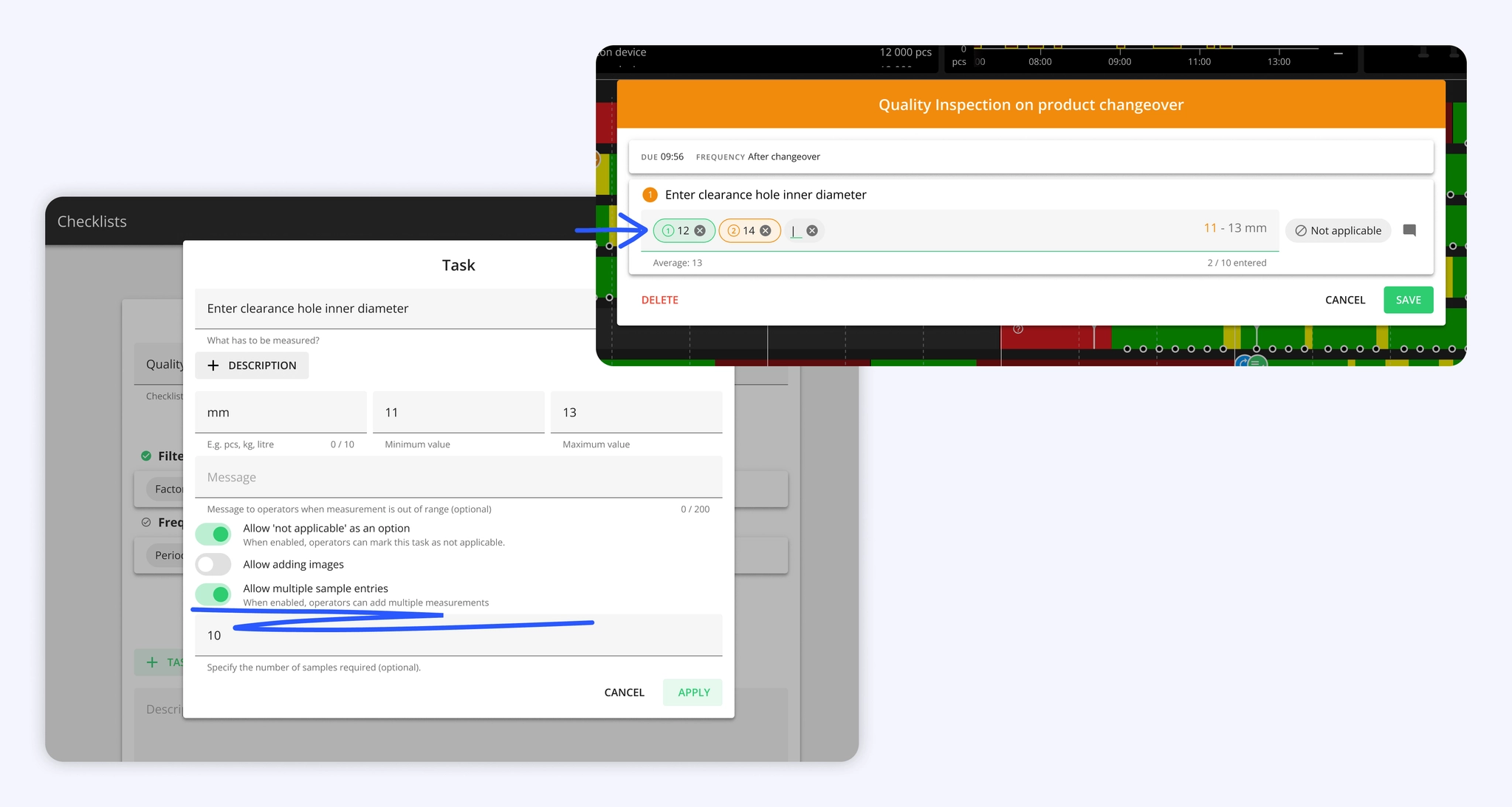
Checklist tasks now support multi-sample input for Measurement task types. Operators enter each sample as an individual value within the same task, and the system tracks how many have been recorded against the required count. A running average is calculated as values are entered, giving immediate feedback on whether the batch is trending within range.
The required sample count is configured per task in checklist settings. If the count is not met, the task is marked as failed regardless of whether individual samples passed. This ensures sampling discipline is enforced, not just result accuracy.
Monitor checklist compliance directly from your Dashboard
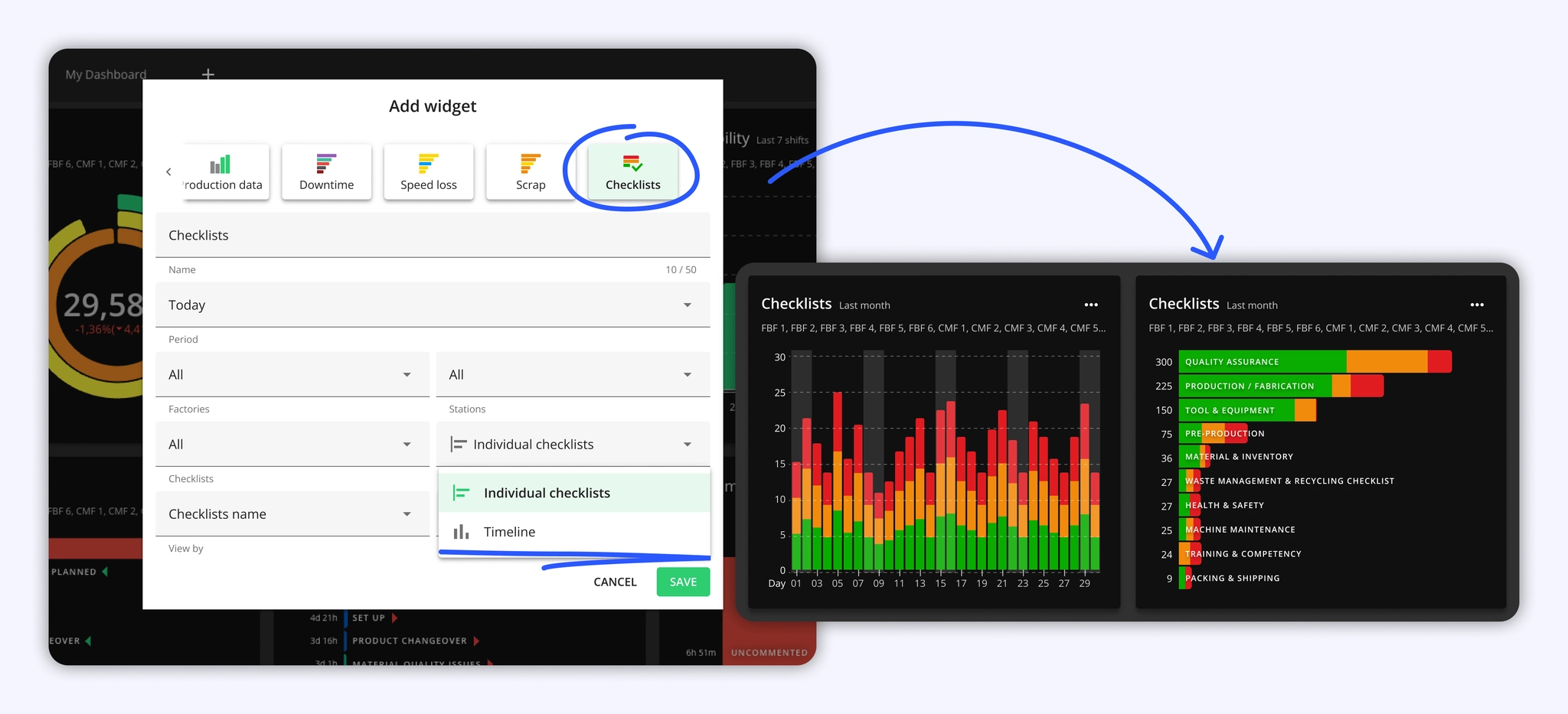
Until now, checklist data lived only in Shift View and Reports. Supervisors who wanted a quick overview of checklist compliance across shifts or stations had to leave the Dashboard and dig through reports, or build their own views in external tools like PowerBI.
The new Checklists widget brings that overview directly to the Dashboard. It shows how many checklists were completed, missed, or unsuccessful across any time period, with the same stacked bar chart format used in the Checklists report.
Two display modes are available.
- Timeline shows checklist status stacked by time (shifts, days, or months depending on the selected period).
- Individual checklists ranks specific checklists or checklist groups by their total count, making it easy to spot which checks are falling behind.
The widget supports the same filters and period options, as in other widgets.
Redesigned Shift View header section
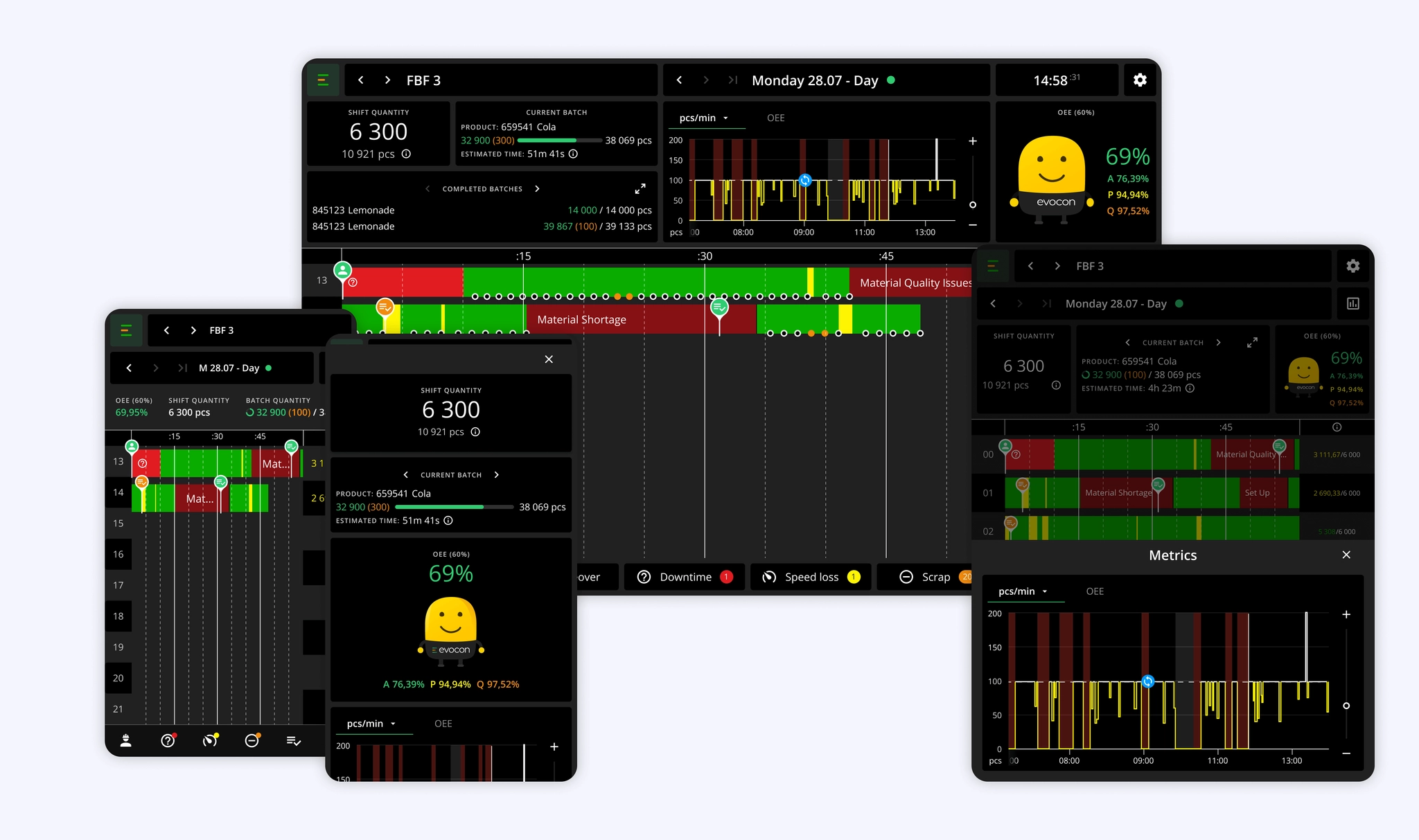
The redesigned Shift View introduces a structured, block-based layout that prioritizes clarity and speed by grouping key production metrics like Shift Quantity, Current Batch, and OEE into distinct sections. This update optimizes how data is presented across all devices, while keeping your production context clear.
The updated header section is especially noticeable on mobile devices. It now brings functionality that was previously available only on larger screens to mobile and tablet users. As factory device usage is increasingly shifting toward mobile phones and tablets, we have extended desktop-level functionality to these devices.
Batch widgets and production data — including OEE, Speed, and Production metrics — can now be expanded on smaller screens, with full visibility of Mr. Evocon.
Usability improvements
ChecklistsA new "before changeover" trigger places checklists before the changeover point and ties them to the previous product, enabling end-of-batch quality checks to be logged against the correct batch.Factory overviewImproved loading performance for the Live view.
February
Production speed report: validate and optimise your speed targets
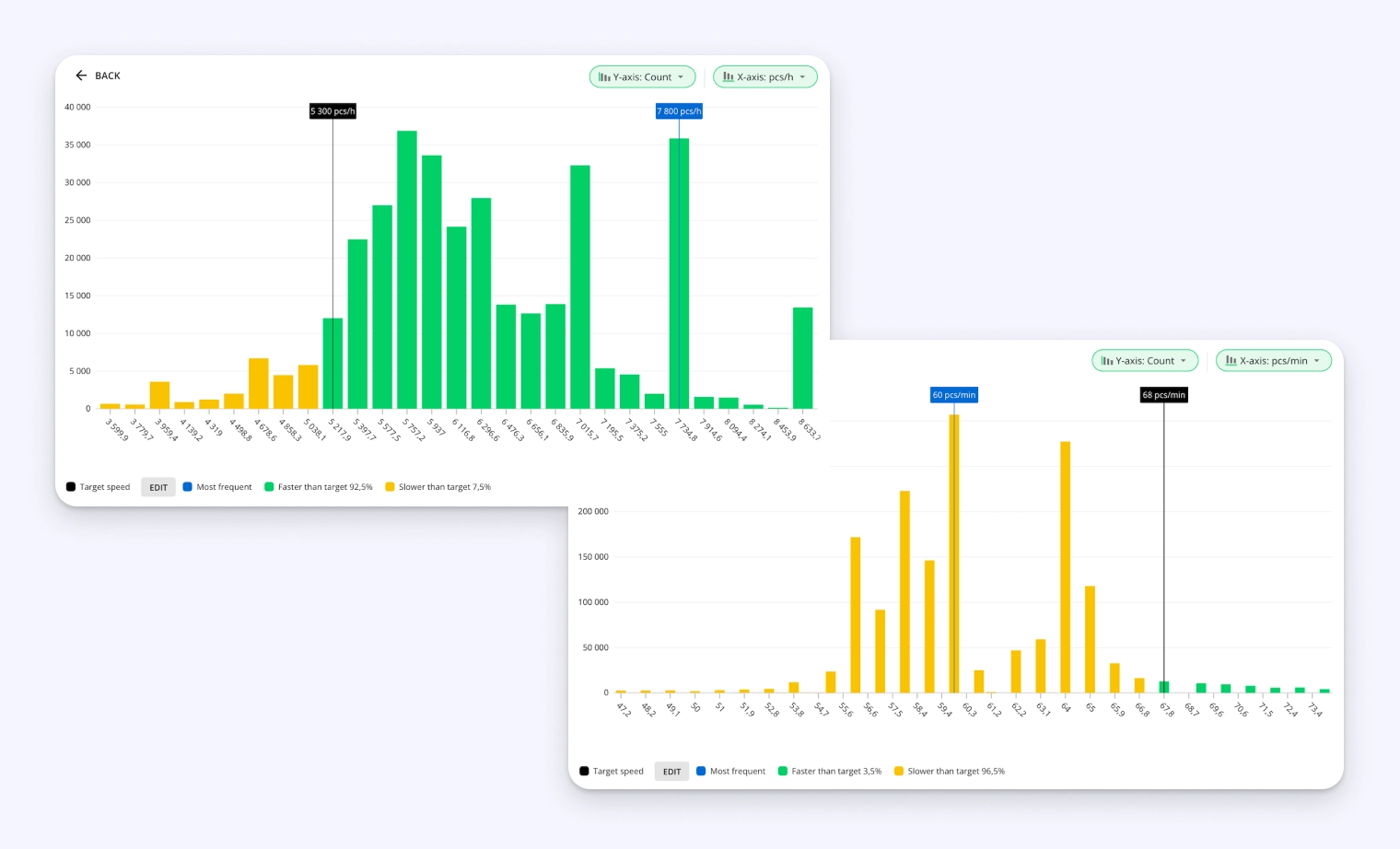
Inaccurate speed targets for products ripple across your OEE scores, capacity plans, costing, and scheduling.
- A target that's too high makes a well-running line look like it's underperforming.
- A target that's too low hides capacity you could be using.
Yet most targets are set once during initial setup and rarely revisited. This leads to poor decisions, from unnecessary investments in new lines to missed delivery commitments.
The new production speed report surfaces the gap between what your speed target is and what it could be. It uses a histogram to show how your production speed distributes over time for a given product and station, highlights the most frequently sustained speed (mode) as a realistic baseline, and automatically filters out outliers. Your current target is overlaid on the histogram, so misalignment is visible at a glance.
Start by reviewing your highest-volume products — those are where wrong targets cost you the most.
Mr Evocon, proudly Estonian since day one
Evocon is proudly based in Estonia, and today we celebrate our Independence Day with our flag held high. The Estonian Declaration of Independence was published in the capital city, Tallinn, on 24 February 1918, establishing the Republic of Estonia.

Hide less relevant checklists on Shift View
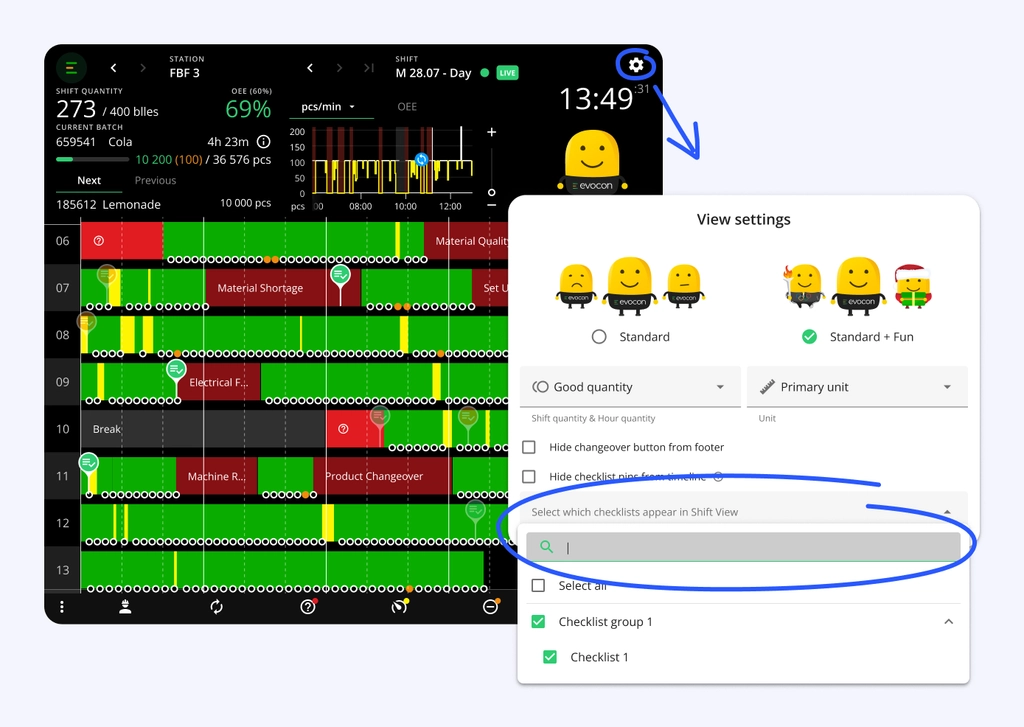
Stations with many active checklists can get visually crowded, especially when pins from multiple departments compete for attention. Operators can now choose which checklists appear on their Shift View, keeping only what's relevant to their role visible.
The setting is in View settings (above Mr Evocon). Unselected checklists are hidden and cannot be filled in while the filter is active.
Mr Evocon goes for gold
The Olympic Mr Evocon is competing live during the Milano Cortina 2026 Winter Olympics.
May your production run as smoothly as a downhill skier carving through fresh powder!

Usability improvements
ReportsTime Usage report gained a Stops filter, letting you choose which downtime reasons factor into time calculations.Shift ViewChecklistsYes/No tasks now support a custom follow-up message when the answer is "No," guiding operators on what to do next — such as escalating an issue or repeating a quality check.AlertsAlert buffer time reduced from 2 to 1 minute, cutting the delay between an event and its alert while still filtering out corrections made by operators.
January
Security settings for enterprise-level control
Enterprise
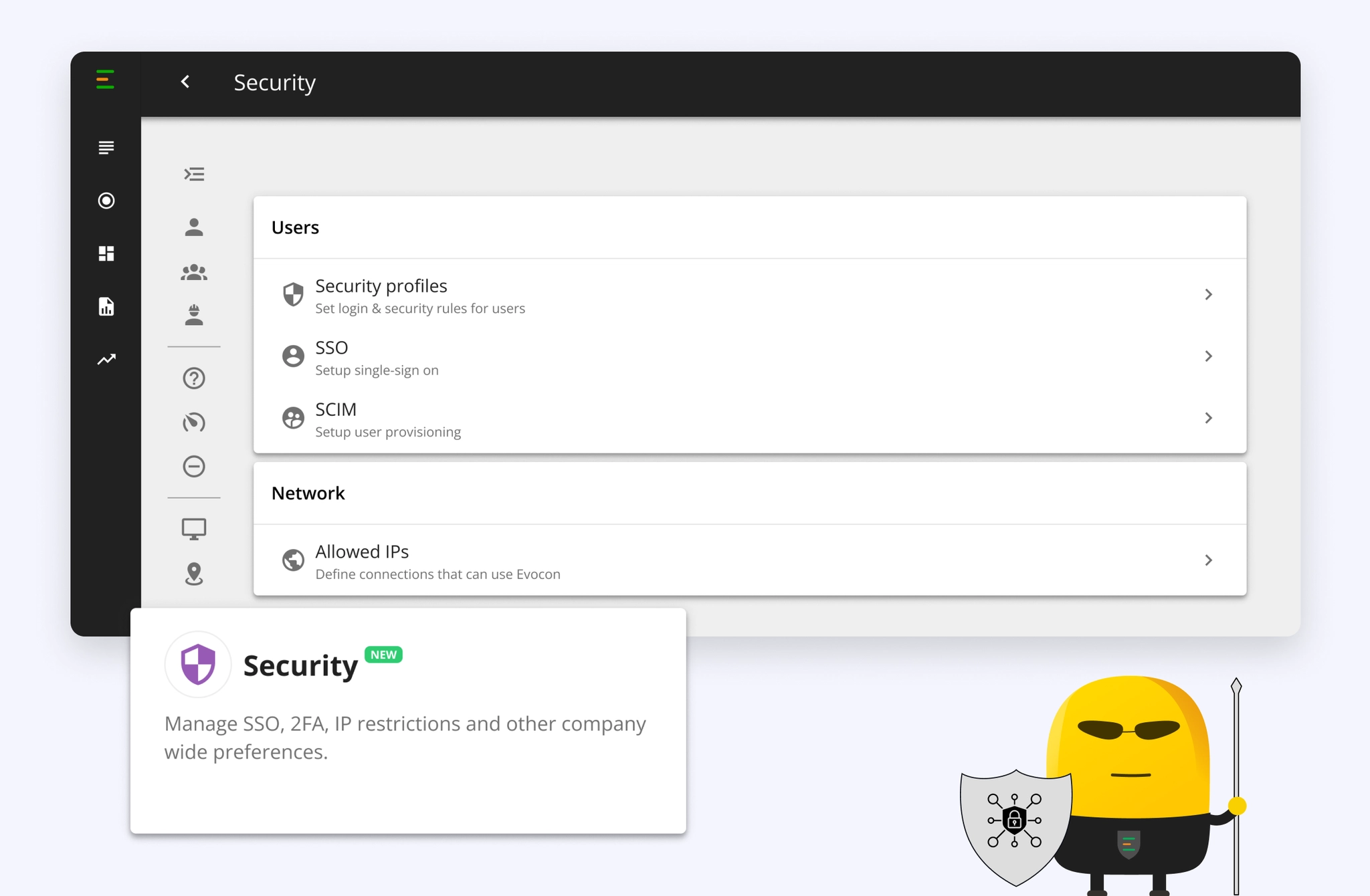
- Security profiles to match different user roles and security needs – Create reusable Security profiles to enforce requirements like single sign-on usage (SSO), mandatory two-factor authentication (2FA), and automated logging out after set amount of days. For example, apply more limited access rights for operators and lighter access for accounts that are used to display dashboards on screens.
- Restrict access to Evocon app with Allowed IPs functionality – Limit access to Evocon by setting up a list of allowed public IPs, optionally adjusted by user role, to prevent access to Evocon from unauthorized networks.
- Centralize security control at the company level – All advanced security settings are managed exclusively by Company administrators, ensuring clear ownership and unified security across the company.
Pinpoint downtime with Machine Locations
We have simplified Machine Locations to help you identify exactly which part of a line is causing a stop.
Reminder of what Machine Locations are
Machine Locations is a "map" of your machine sections, not a physical address.
It helps you break the production line into parts so you can log exactly where a problem happened.
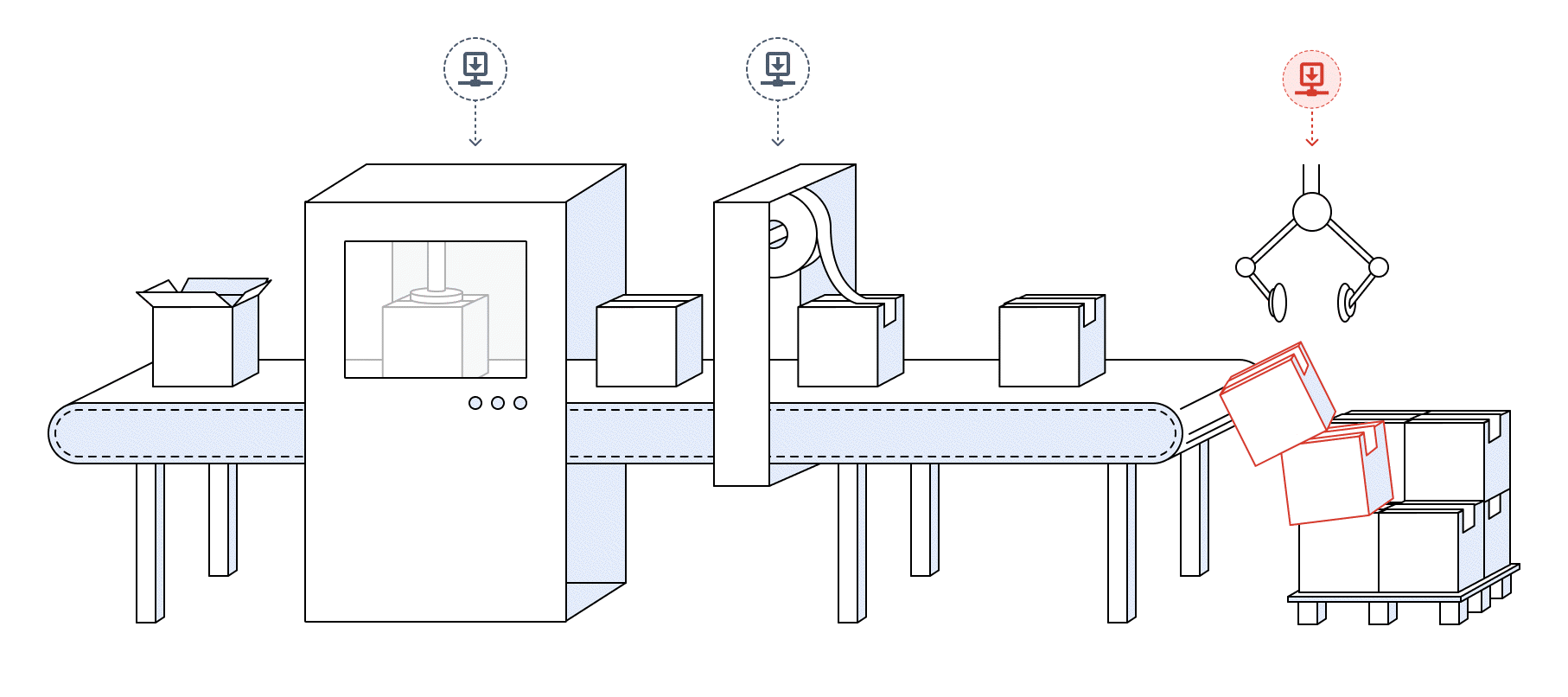
Examples: Infeed, Labeler, Sealer, or Conveyor
Why it matters
By tagging a location to a stop, you can go to the Downtime and Speed Loss Report and set the X-axis to "Location." This helps you analyse which stops are happening at which locations so you can better plan your improvement activities.
Improved “Time Remaining” estimates
Production time estimates in Evocon are now more accurate.
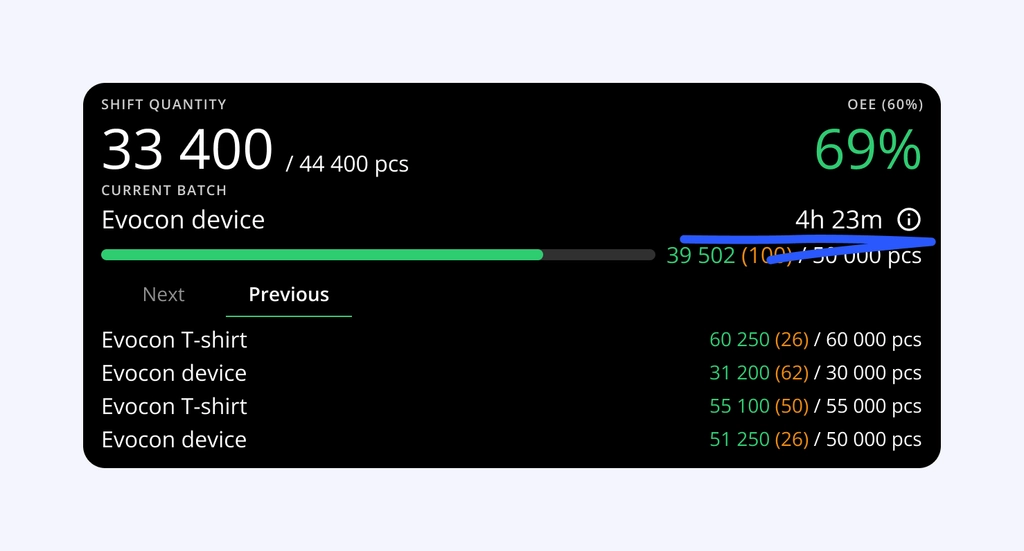
Previously, signals, with irregular quantities, could throw off your completion estimate by hours until production stabilised. The new model is using the harmonic mean of the last 5 signals which is much better at automatically filtering out anomalies, giving you more reliable data for planning.
This improvement is already active for all production orders with no action required on your part.
More information in our support page.
Flexible downtime registration in Shift View
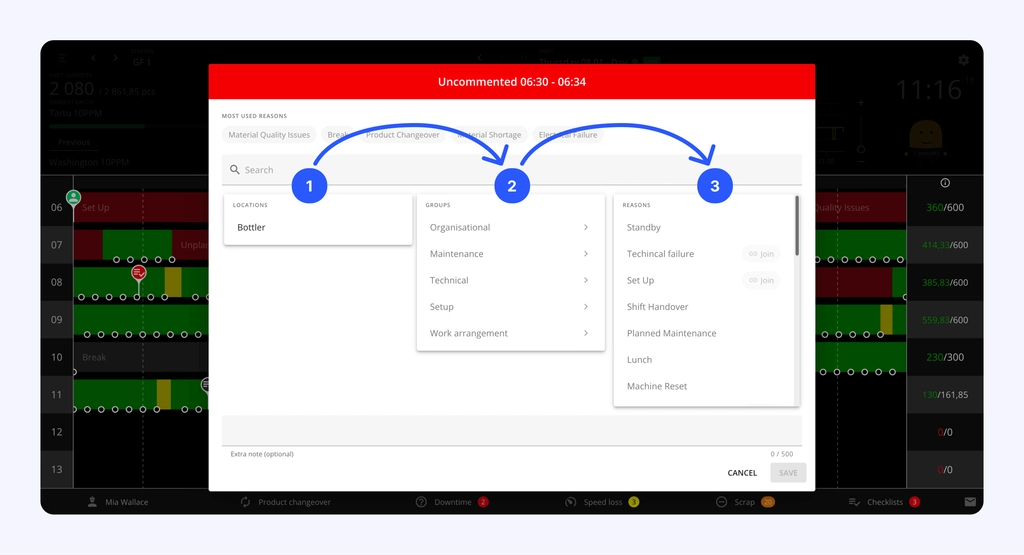
We have introduced new configuration options for downtime and speed loss registration to better align with your shop-floor logic. You can now choose the most intuitive sequence for operators to categorize losses.
Three possible options:
- Group → Reason → Location (Default)
- Location → Group → Reason
- Group → Location → Reason
Why use this?
Matching the registration flow to your team's mental model reduces cognitive load and entry errors. Whether your operators prioritize the physical area (Location) or the category of the stop (Group), these flexible sequences ensure that data entry is faster, more logical, and reflects your specific site hierarchy.