
Hardware and connectivity · Guide 5 of 15
Hardware - Evocon IIoT device 3 - How to connect an analog signal
How to wire a 0…10V analog signal to Input 3 of the Evocon IIoT device 3, remove the 0V jumper, and use the timer-triggered or input-triggered analog modes.
Connecting the analog signal
All inputs of the Evocon device have the same pin "mapping".
Pin 1 - Brown - +24V from device. NOT USED for connecting analog signal.
Pin 2 - White - NOT USED for connecting analog signal.
Pin 3 - Blue - 0V
Pin 4 - Black - Analog input (0…10V) on input 3
Before connecting an actual analog signal, make sure that the input 3 is calibrated. This can be done by writing to [email protected] and asking for this information. Or you can calibrate the input using this guide:
Hardware - Evocon IIoT device 3 - Analogue input calibration guide
Here is a drawing of the connection for INPUT 3 to measure analog voltage. You can use a different voltage source (scale, frequency converter,…) instead of a PLC. If the analog signal is also used for other equipment, please install a galvanic isolator (example).

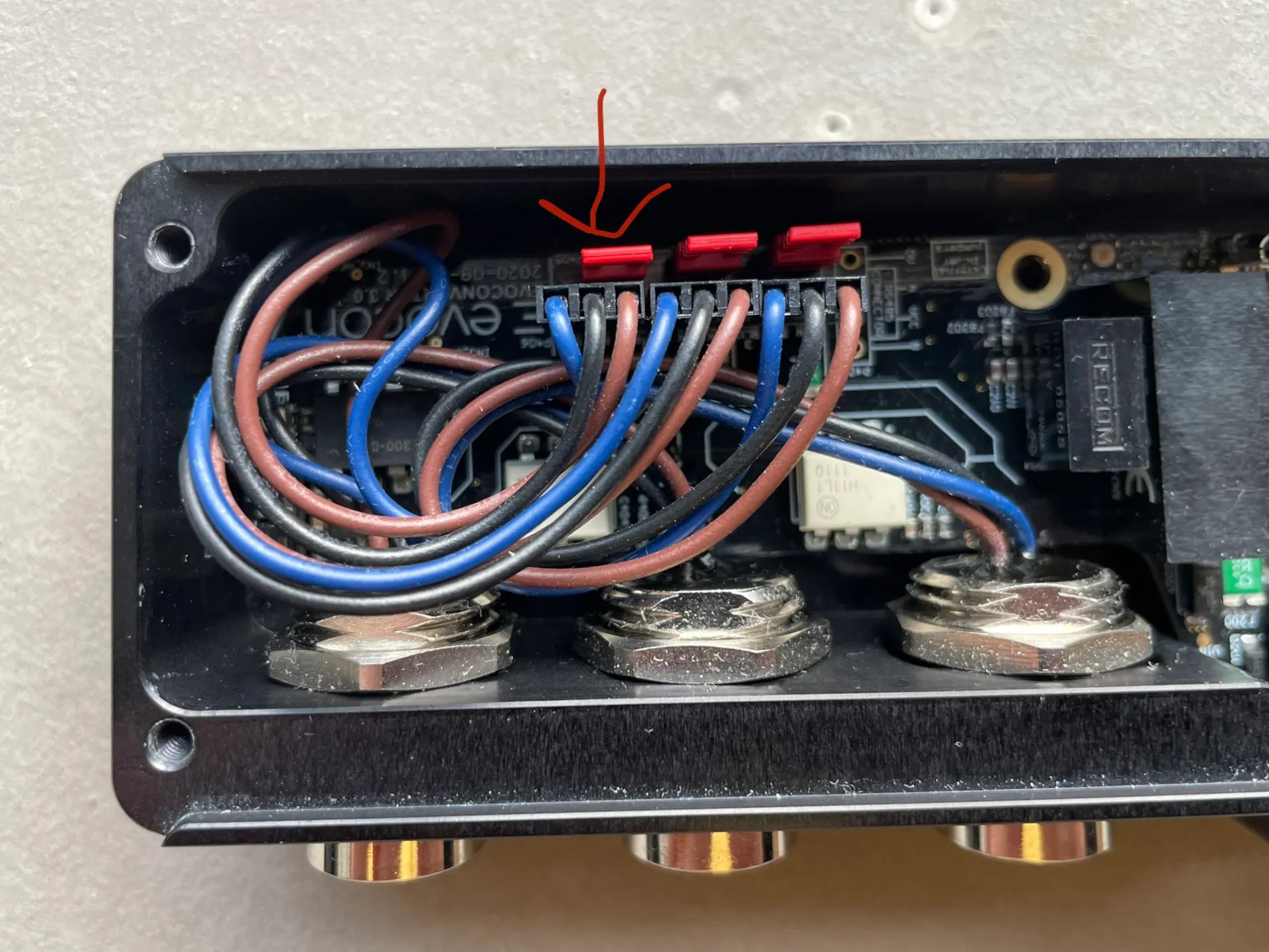
As an external voltage is connected to Input 3, the jumper that connects the input 0V to the devices’ 0V must also be removed. The jumper is indicated in the picture below. Just pull it up to remove. Use 2mm hex bit to open the device cover.
Analog mode configurations
Analog measuring modes
Input 3 can be used either in timer-triggered mode (measure value every 60 seconds) or input-triggered mode (measure value when Input 1 is active).
Minute mode
To measure the analog value in "timer-triggered" mode, only input 3 must be connected. Evocon will configure an appropriate period for the input. This mode is useful for temperature or other parameter measuring once every 60 seconds.
Trigger mode
To measure the analog value in an "input-triggered" mode, a trigger signal can be connected to Input 1. When trigger signal is ON, the analog value is measured and summed. If trigger is OFF, analog value is not measured. This mode can be used for measuring meters of a product via a trigger and 1-10V signal from the frequency converter.
Input 1 signal can be a sensor or signal from PLC. The connection is as described here: