Reports and analysis · Guide 7 of 28
Reports: OEE
What the OEE report chart and data table show, how Availability, Performance, Quality, Technical availability, OEE, OOE and TEEP are calculated, and how the OEE total and the stops filter work.
On this page
The OEE report is all about seeing the efficiency of your production process. You can analyze OEE based on the selections you make in the filters and for the x-axis. Each of the options gives you a unique way of seeing your production process so that you can spot trends and understand how each of the OEE components (performance, availability, quality) affects your overall efficiency.
OEE (Overall Equipment Effectiveness) is a lean manufacturing tool and universal best practice to monitor, evaluate and improve the effectiveness of a production process. This could be an assembly line, machine cell, packaging line, filling machine, etc.
Note: Please find the description of the general reports features here.
What does the OEE chart show?
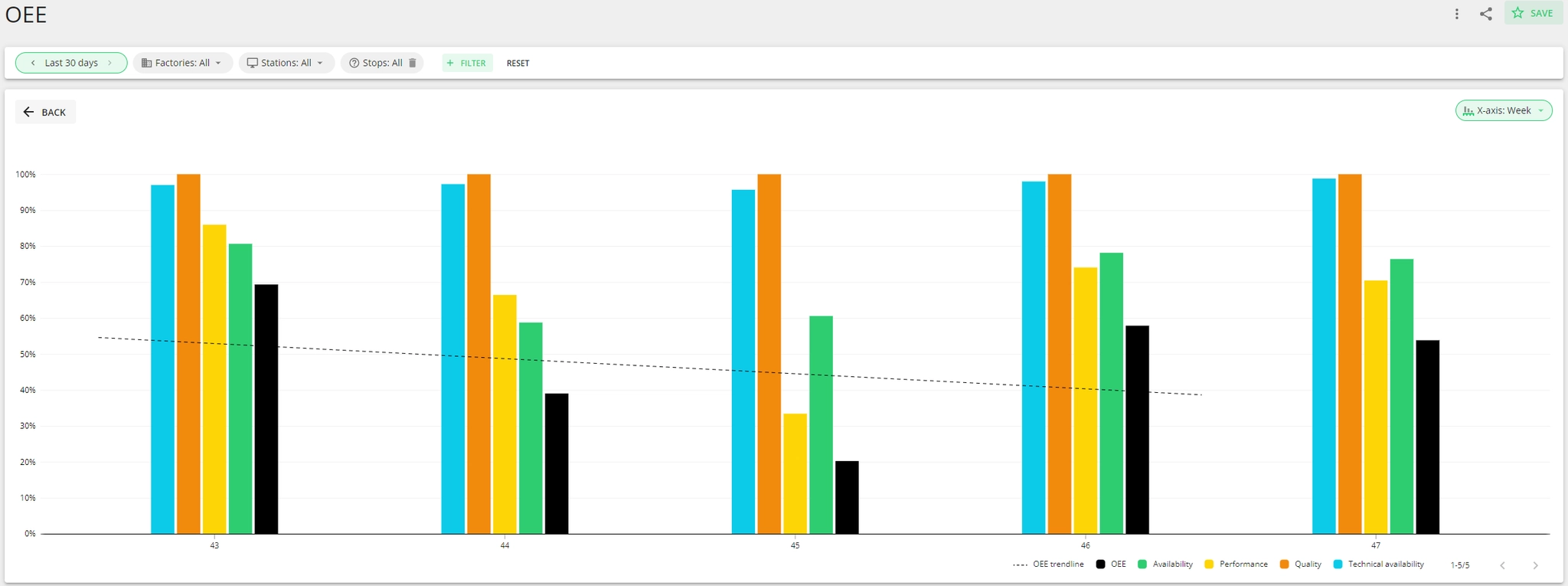
The OEE chart visualizes how effectively you utilize your plant and production equipment. It allows you to see how the three components of OEE change in time and what effect each of them has on the overall OEE percentage. The chart also visualizes technical availability and it is possible to view it either as a bar chart or a line chart.
What production data is displayed in the OEE data table?
No matter the category you choose to analyze, you will have information regarding availability, technical availability, performance, quality and OEE.
-
Availability represents the percentage of planned time that a station (production line or workstation) is actually working or producing. Availability is part of the OEE equation.
- Availability = Operating time / Planned time
- In Shift View colors, Availability = (green + yellow) / (shift time - planned stops not included in OEE)
-
Performance represents the actual running speed of the equipment against its specified running speed. Performance is part of the OEE equation. Performance over 100% can mean that measuring of production is not set up correctly or targets (ideal cycle times) are set too low.
- Performance = produced quantity / ideal produced quantity
- Ideal produced quantity = quantity that could have been produced during the planned time that was not covered with downtime at ideal speed. This means green plus the quantity that could have been produced during the speed loss (yellow).
- In Shift View colors, Performance = green / (green + yellow)
- Performance = produced quantity / ideal produced quantity
-
Quality indicates the amount of products meeting the quality requirements (good products) out of all products produced. Quality is part of the OEE equation.
- Quality = good products / (good products + scrap)
- In Shift View, scrap is visualized using orange product circles.
-
Technical availability, as a percentage, represents planned time with the exclusion of unplanned technical stops. This means that it shows the percentage of planned time without unexpected technical difficulties or maintenance needs and helps you understand how well your maintenance is organized.
- Please find more information here: Technical availability
- Technical availability = (planned time - unplanned technical stops) / planned time.
-
OEE is an asset performance indicator that shows how effectively the equipment is utilized. OEE breaks the effectiveness of a manufacturing unit into three components: availability, performance and quality.
- OEE = quality x availability x performance.
-
OOE (Overall Operations Effectiveness) - measures how effectively equipment is utilized during all scheduled production time, including planned stops excluded from OEE.
- OOE = (Operating Time / Shift Time) × Performance × Quality
-
TEEP (Total Effective Equipment Performance) - measures the maximum potential utilization of equipment by considering all available calendar time (24/7), not just scheduled production time.
- TEEP = (Operating Time / All Time) × Performance × Quality
-
Operating time is the sum of good production and speed loss. Often also referred to as run time.
-
Planned time is the total time allocated for the shift, minus planned stops which are configured in such a way that when they happen, they don't reduce the OEE of the shift.
-
Shift time = planned time + planned stops (excl. from OEE).
-
All time means calendar time (24/7).
-
Total quantity (primary and alternative unit) = good quantity + scrap.
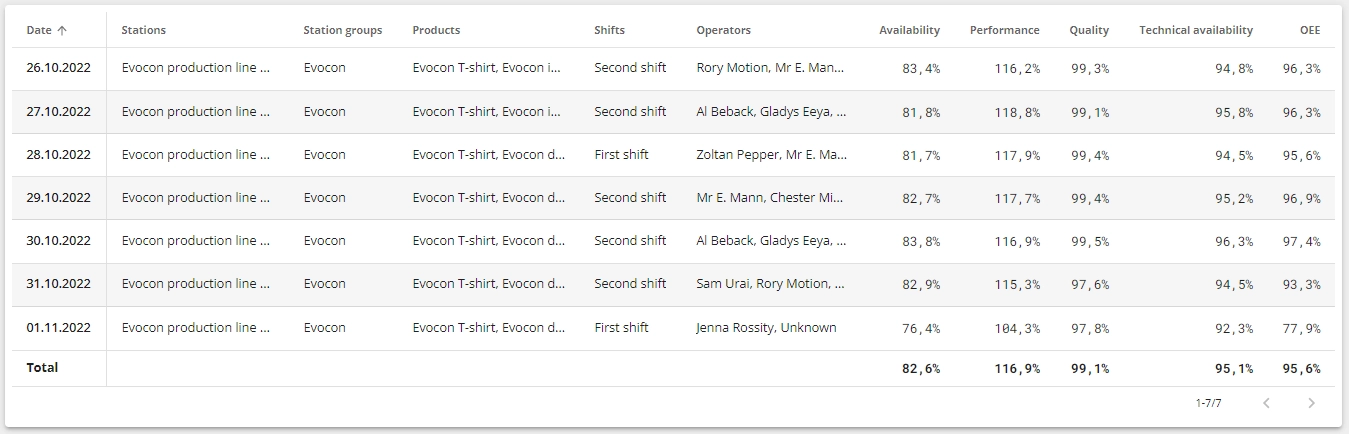
The Total of OEE is calculated for the whole period with the set filters, taking into account the planned production time (not as any average of the individual values in the data table).
- Planned production time = Shift time - Planned stops not included in OEE
Example of total OEE calculation:
Total OEE of a month
- Availability of the month = (sum of operating time of all shifts in that month) / (sum of planned time of all shifts in that month)
- operating time = time when the machine was operating (green or yellow)
- planned time = shift time - planned stops
- Performance of the month = (sum of good production time of all shifts in that month) / (sum of all good and speed loss times of all shifts of the month)
- good production time = green time in Shift view
- speed loss time = yellow time in Shift view
- Quality of the month = (sum of good quantity of all shifts in that month) / (sum of total quantity of all shifts in that month)
- OEE of the month is the multiplication of the 3.
Example of using stops filter in the OEE report and how it can affect OEE and Technical Availability:
When a stop is filtered out in the OEE report, its duration is removed from planned time. Since both OEE and technical availability (TA) are calculated from planned time, filtering can affect both metrics.
How it changes depends on the stop type. Let's use a simple example: 8h planned time, 1h of technical downtime, and 1h of a non-technical stop.
Before filtering, TA = (8h - 1h) / 8h = 87.5%
If the filtered stop is included in TA (the 1h example), both the downtime and the planned time are removed. TA = (7h - 0h) / 7h = 100%. The calculation loses both the technical downtime and reduces planned time.
If the filtered stop is NOT included in TA (1h of non technical downtime), planned time shrinks but the TA downtime (1h) stays the same. TA = (7h - 1h) / 7h = 85.7%. TA actually gets worse, because the same 1h of technical downtime is now measured against 7h instead of 8h.
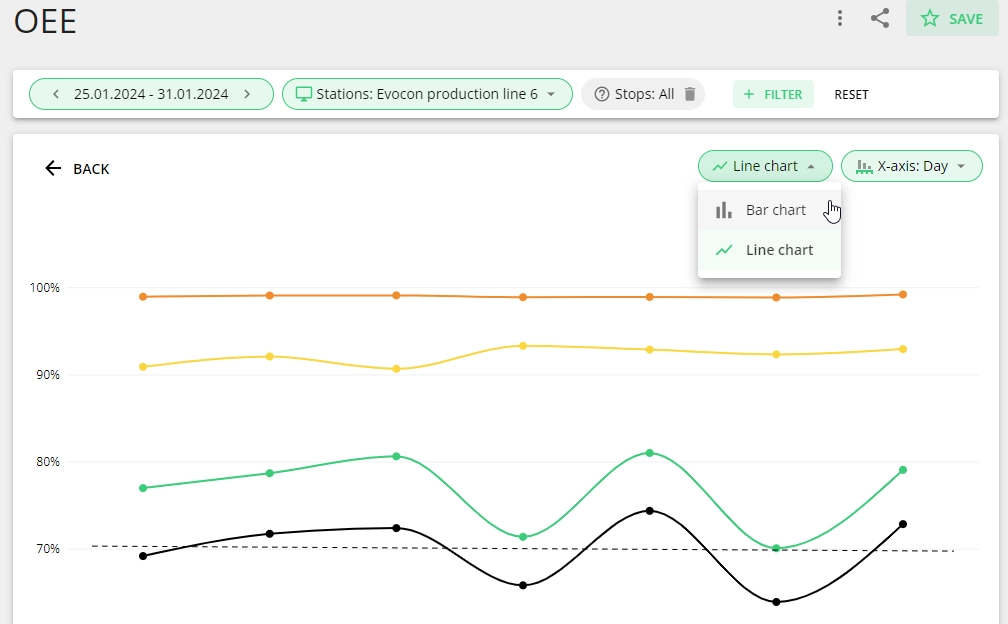
How to change the chart type?
For OEE chart it is possible to choose between bar and line chart and this can be done from the dropdown on the chart area (top right corner):