
Reports and analysis · Guide 3 of 28
Terms and definitions
Definitions of the columns, metrics and formulas used in the Downtime, Speed loss, Scrap, OEE, Quantities, Time usage and Checklists reports.
On this page

Downtime report
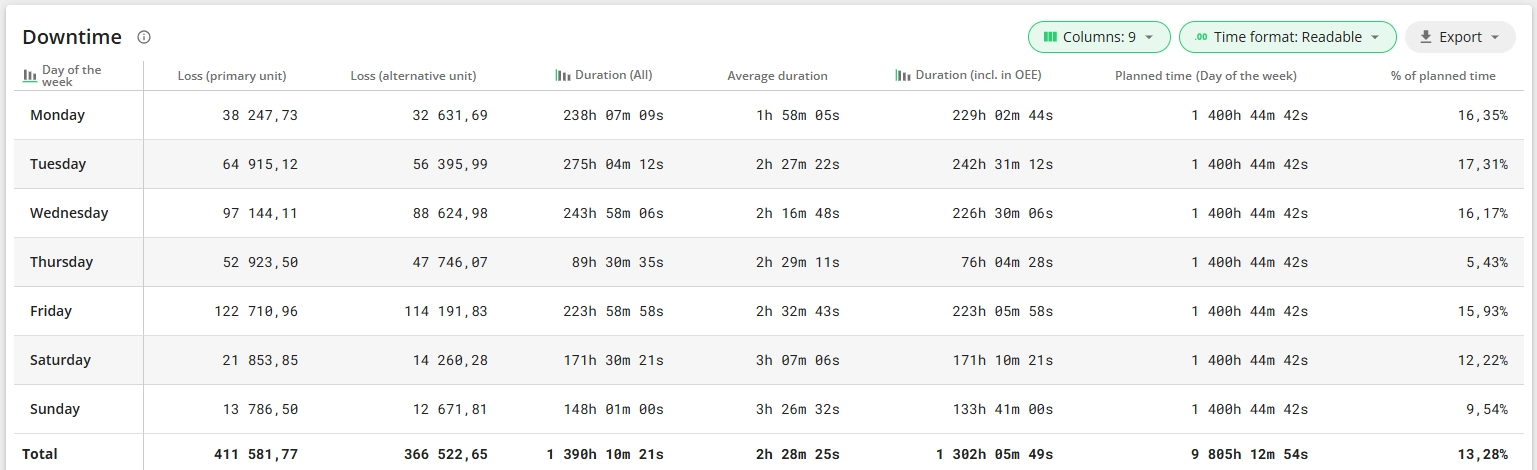
Stop types - there are two types of stops – unplanned and planned.
- Planned stops include the time when production is scheduled to be stopped (e.g. planned maintenance). They are also divided into two: included in OEE calculation and excluded from it.
- Any other stoppage of production that has not been planned is considered as an unplanned stop.
Count - number of downtime events (occurrences).
Notes - number of extra notes added to the downtime events.
Loss (primary and alternative unit) - units lost due to downtime (availability loss).
- [Planned stops included in OEE + unplanned stops + uncommented stops] converted into units.
Duration (All) - total time lost due to downtime.
Average duration - the average duration of one stop with that specific reason.
Duration (incl. in OEE) - the duration of stops included in the OEE calculation.
Planned time - total planned time. The total time allocated for the shift, minus planned stops which are configured in such a way that when they happen, they don't reduce the OEE of the shift (they reduce the planned time).
% of planned time - time lost, as percentage of planned time.
Speed loss report
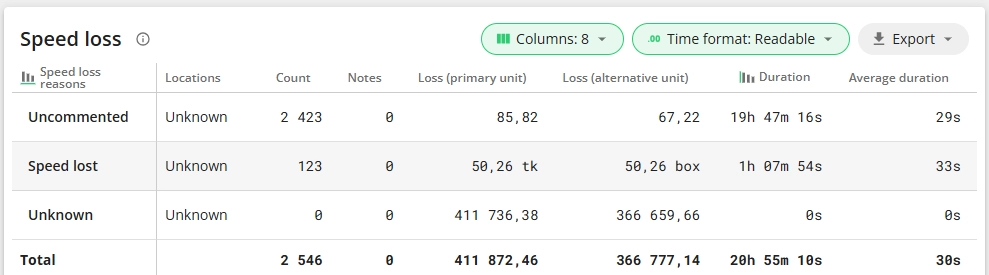
Speed loss - time in between two sensor signals that exceeds set cycle time and is less than stop start time. Example: set cycle time is 1 unit per minute and stop start time is 5 minutes. If the time between signals is 4 minutes, then 3 minutes is considered as speed loss.
Count - number of speed loss events. When speed loss is commented, all yellow pieces that are selected on the Shift View and commented together are joined and counted as one speed loss event - a group. When speed loss is uncommented, all yellow pieces are counted as separate speed loss events, but are considered as one group.


Loss (primary and alternative unit) - units lost due to speed loss (performance loss).
Duration - total time lost due to speed loss (speed loss time converted into units).
Average duration - average time lost during one speed loss event. When speed loss is commented, all yellow pieces that are selected on the Shift View and commented together are joined and counted as one speed loss event. When speed loss is uncommented, all yellow pieces are counted as separate speed loss events.
Scrap report
% of produced - percentage of scrap among all produced items (scrap vs total).
Time lost - scrap recalculated in terms of time (number of items lost, multiplied by time needed to produce each item)
% of planned time - time lost, as percentage of planned time.
Planned timeis the total time allocated for the shift, minus planned stops which are configured in such a way that when they happen, they don't reduce the OEE of the shift (they reduce the planned time).
OEE report

Availability = Operating time / Planned time - represents the percentage of planned time that a station (production line or workstation) is actually working or producing.
Operating time = Production time = Good production + Speed loss = Green + Yellow
Performance = Total quantity / Ideal produced quantity - represents the actual running speed of the equipment against its specified running speed. Performance over 100% can mean that measuring of production is not set up correctly or targets (ideal cycle times) are set too low.
Ideal produced quantity = quantity that could have been produced during the planned time that was not covered with downtime at ideal speed. This means green plus the quantity that could have been produced during the speed loss (yellow).
Quality = Good quantity / (Good quantity + Scrap) - indicates the number of products meeting the quality requirements (good products) of all products produced.
Technical availability = (Planned time - unplanned technical stops) / Planned time - shows the percentage of planned time without unexpected technical difficulties or maintenance needs and helps you understand how well your maintenance is organised.
OEE = Quality x Availability x Performance - an asset performance indicator that shows how effectively the equipment is utilised. OEE breaks the effectiveness of a manufacturing unit into three components: availability, performance and quality.
OOE (Overall Operations Effectiveness) - measures how effectively equipment is utilized during all scheduled production time, including planned stops excluded from OEE.
OOE = (Operating Time / Shift Time) × Performance × Quality
TEEP (Total Effective Equipment Performance) - measures the maximum potential utilization of equipment by considering all available calendar time (24/7), not just scheduled production time.
TEEP = (Operating Time / All Time) × Performance × Quality
Operating time is the sum of good production and speed loss. Often also referred to as run time.
Planned time is the total time allocated for the shift, minus planned stops which are configured in such a way that when they happen, they don't reduce the OEE of the shift.
Shift time = planned time + planned stops (excl. from OEE).
All time = 24/7 calendar time
Total quantity (primary or alternative unit) = good quantity + scrap
Quantities report
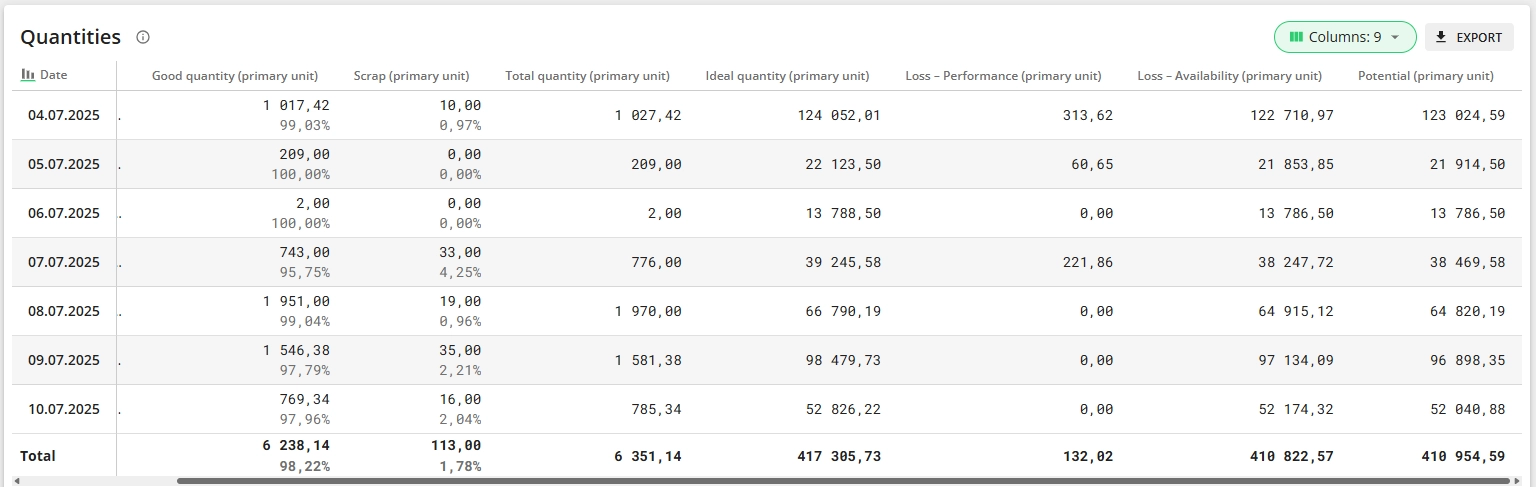
Good quantity = Total quantity - Scrap
Scrap - the amount of units scrapped
Total quantity - the amount of units produced (including scrap)
Potential = Ideal quantity - Total quantity
Ideal quantity - the quantity that would have been possible to be produced during planned time at ideal speed. So, if there had not been any speed loss, unplanned downtime or planned downtime that is included in the OEE calculation.
Loss Availability represents units lost due to downtime.
Loss Performance represents units lost due to speed losses.
Time usage report
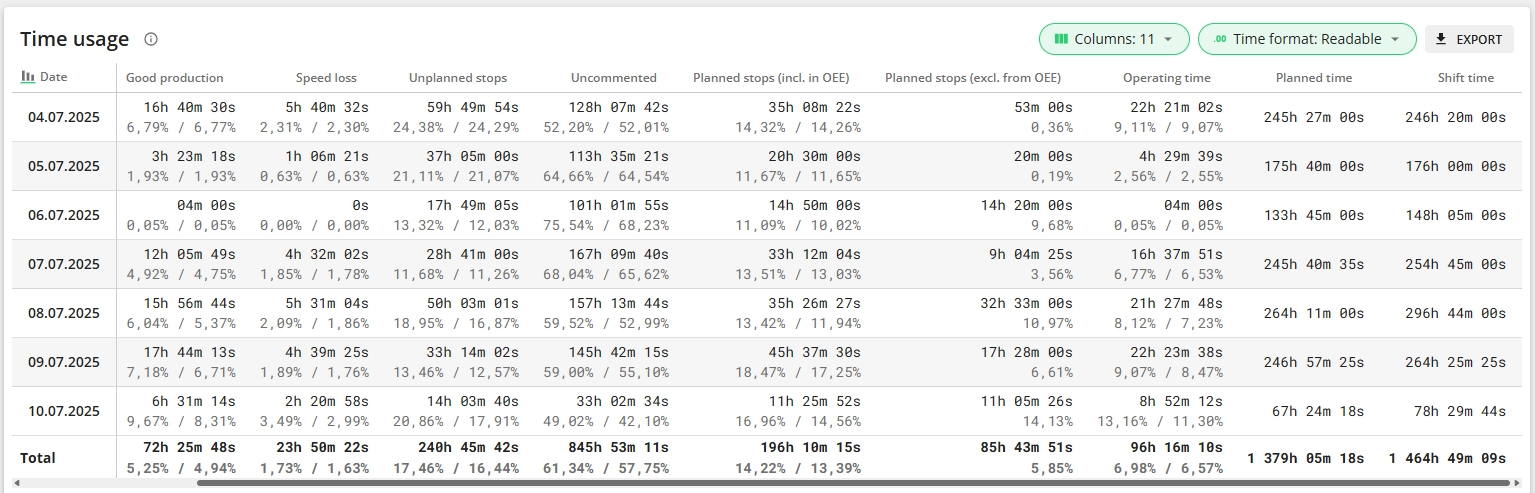
Please note that the percentages are calculated based on total production time and not planned time (planned time is not the sum of other columns).
Good production - time when production is running as planned or faster – according to set cycle time.
Speed loss - time in between two sensor signals that exceeds set cycle time and is less than stop start time. Example: set cycle time is 1 unit per minute and stop start time is 5 minutes. If the time between signals is 4 minutes, then 3 minutes is considered as speed loss.
Planned stops Planned stops are usually configured to be excluded from OEE calculation. This means that having planned stops does not reduce your OEE (they reduce planned time). Examples - plant shutdowns, standby periods. However, they can be configured to be included in OEE calculation. In this case, planned stops reduce OEE just like unplanned stops.
Unplanned stops Unplanned stops (equipment failures, material shortages etc) are considered waste. They reduce availability and OEE and they should be reduced to a minimum.
Uncommented Total duration of uncommented downtime.
Planned time is the total time allocated for the shift, minus planned stops which are configured in such a way that when they happen, they don't reduce the OEE of the shift.
Operating time is the sum of good production and speed loss. Often also referred to as run time.
Shift time = planned time + planned stops (excl. from OEE). All time covered by shifts.
Checklists report

Count - number of Checklist events (pins on Shift View).
Successful - number of Checklist events where all tasks were successful (green pin). Meaning all tasks were done and results were in the allowed range/acceptable.
Unsuccessful - number of Checklist events where some tasks failed or were not filled (orange pin).
Missed - number of Checklist events where checklists were not done (red pin).
Average time - average time to complete checklists. Missed checks are excluded from the calculation.