
Hardware and connectivity · Guide 2 of 15
Hardware - Evocon IIoT device 3.0 - Technical specification and user manual
On this page
Hardware - Evocon IIoT device 3.0 - Technical specification and user manual
View details
Overview of Evocon installation
Evocon system hardware consists of a Evocon IIoT device (data logger), industrial sensor or a connection to a relay or PLC I/O, power adapter and network connection (wired or wireless). Below is a diagram of a standard solution.
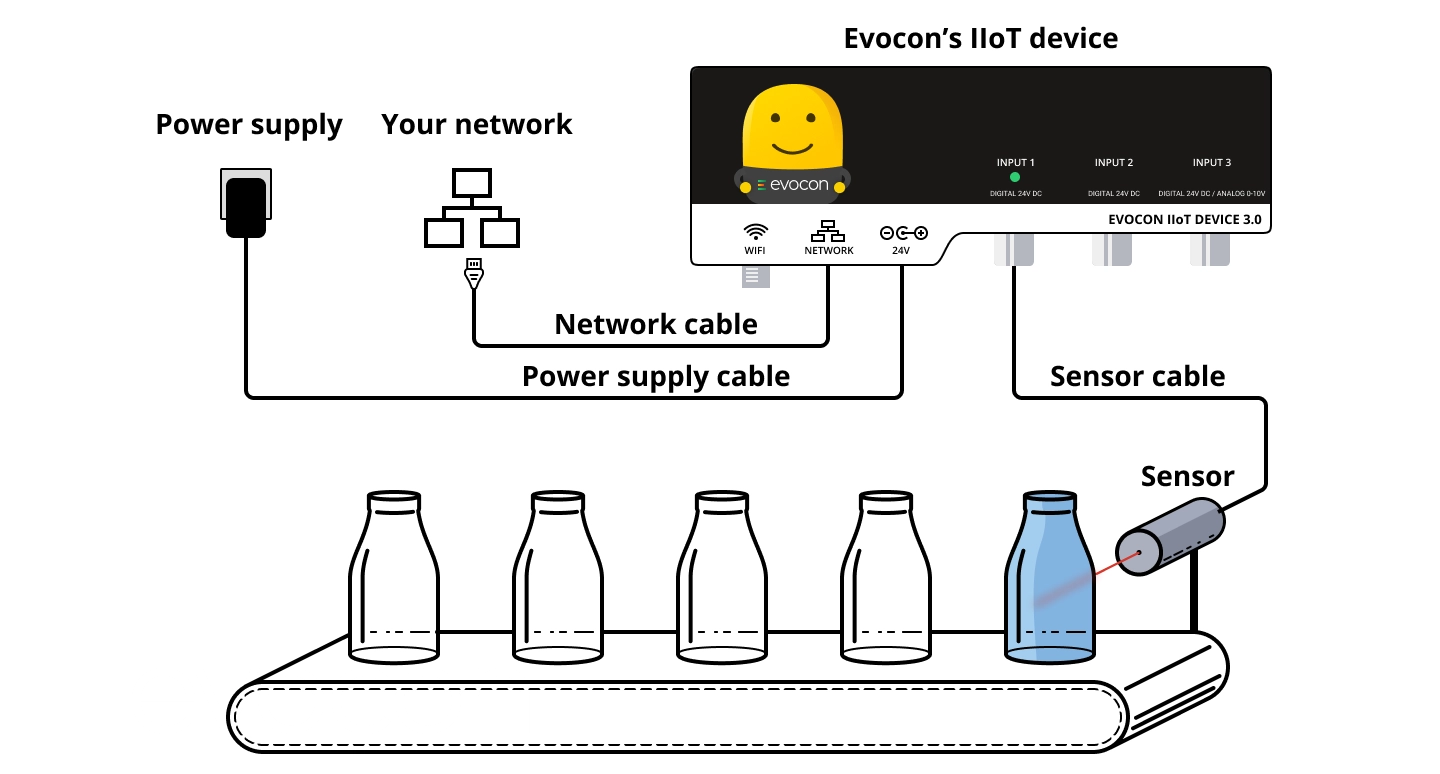
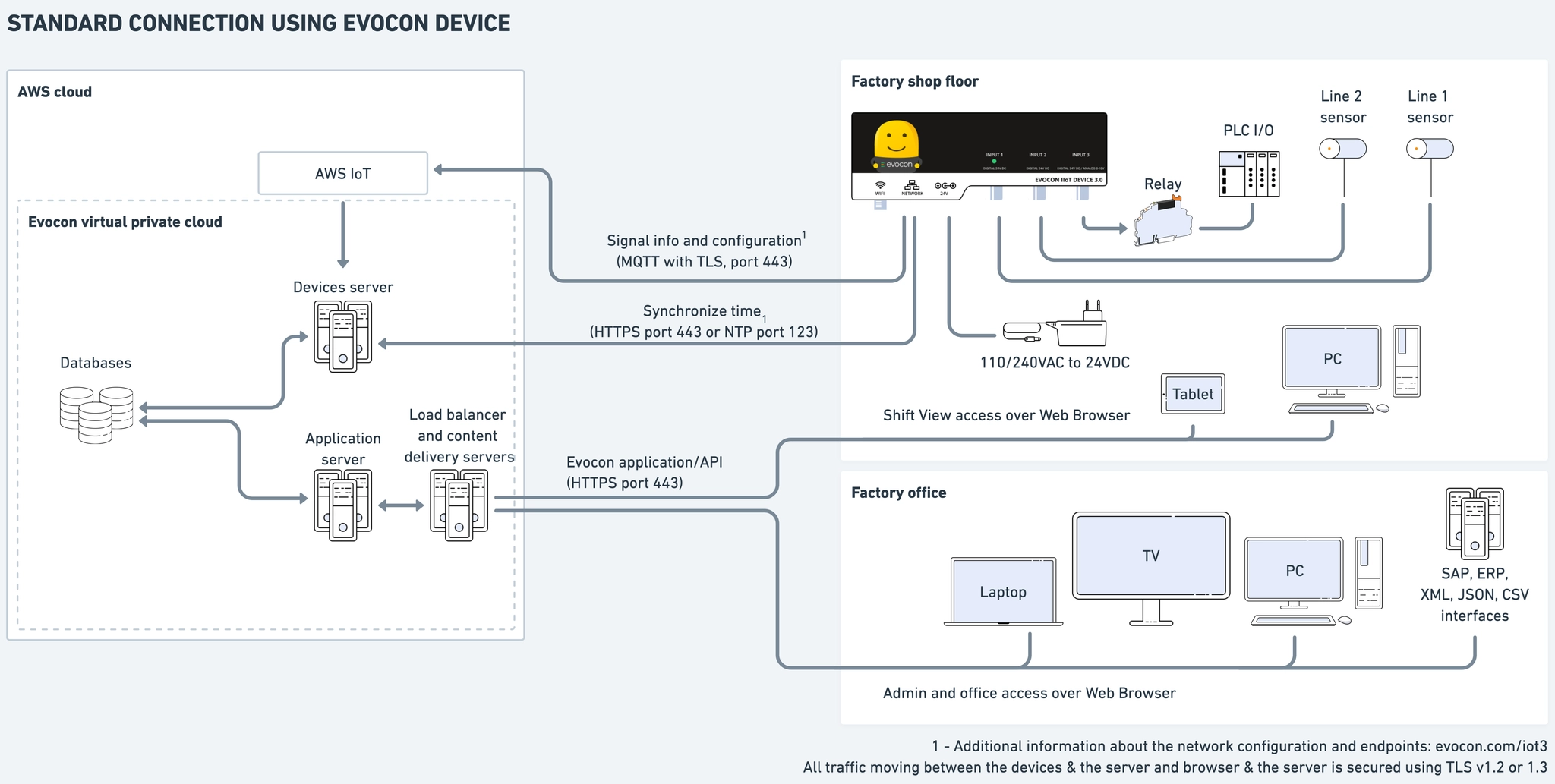
Evocon solution Architecture overview
Evocon IIoT device
Evocon devices are built to suit the needs of different types of production. Using standard M12 connectors on inputs makes collecting data from one line or separate production lines easy to set up. It can be powered from a wall outlet using a 110/230V AC to 24V DC power supply provided with the device. It is also possible to use an existing 24V DC power source. In this case, use the barrel connector from the power supply. The centre of the connector is positive 24V DC and the outer ring is 0V.
The case of the Evocon device is made of anodized aluminium and it weighs 250g and measures 147mm x 57mm x 28mm.
Functionality overview
| Electricaldata | |
|---|---|
| Operatingvoltage | Rated24VDC permissible23 28VDC , ... |
| Currentconsumption | <50mA* |
| Signalinputs | |
| Numberofinputs | 2digital+1digital/analog(input3) |
| Inputisolation | Opticalisolationonallinputs** . |
| Supportedsensortype | PNP |
| Switchinglevel(high) | >22VDC |
| Switchinglevel(low) | <5VDC |
| Shortestdetectablesignaltime | 1ms |
| Inputconnectors | A -type 3 -pin M12 Female |
| Inputstatusindicator | 3x bi -colour LED 1 for each input , |
| Networking | |
| Availableconnectivity | Ethernet(RJ45) WiFi(24GHzonly) , . |
| SupportedEthernetspeed | 10/100Mbps |
| SupportedWiFistandards | 24GHz80211b/g/n*** . . |
| SupportedWiFisecurity | WPA/WPA2 Opennetwork , |
| DHCPsupport | |
| StaticIPsupport | |
| Proxysupport | |
| CustomDNSsupport | |
| Customhostnamesupport | |
| CLIoverUSBsupport | |
| Over-the-air updates | |
| Connectiontocloud | HTTPS MQTT(TCP443 8883) , , |
| Operatingconditions | |
| Ambienttemperature(°C) | -20 to +65 |
| Protection | Dustresistant Notprotectedfromwaterspray . |
| Mechanicaldata | |
| Casematerial | anodisedaluminium |
| Weight(g) | 250 |
Dimensions (mm) 147 x 57 x 28
- Current draw depends on the number and power usage of the sensors connected and powered by the Evocon device.
** Electrical isolation between input ground and device ground can be achieved by removing an internal jumper.
*** Evocon IIoT Device 3 does not support 5GHz WiFi. For safe operation, the device must be installed in an open location ensuring that no individual is closer than 5 cm to the antenna for a continuous period of 6 minutes or longer.
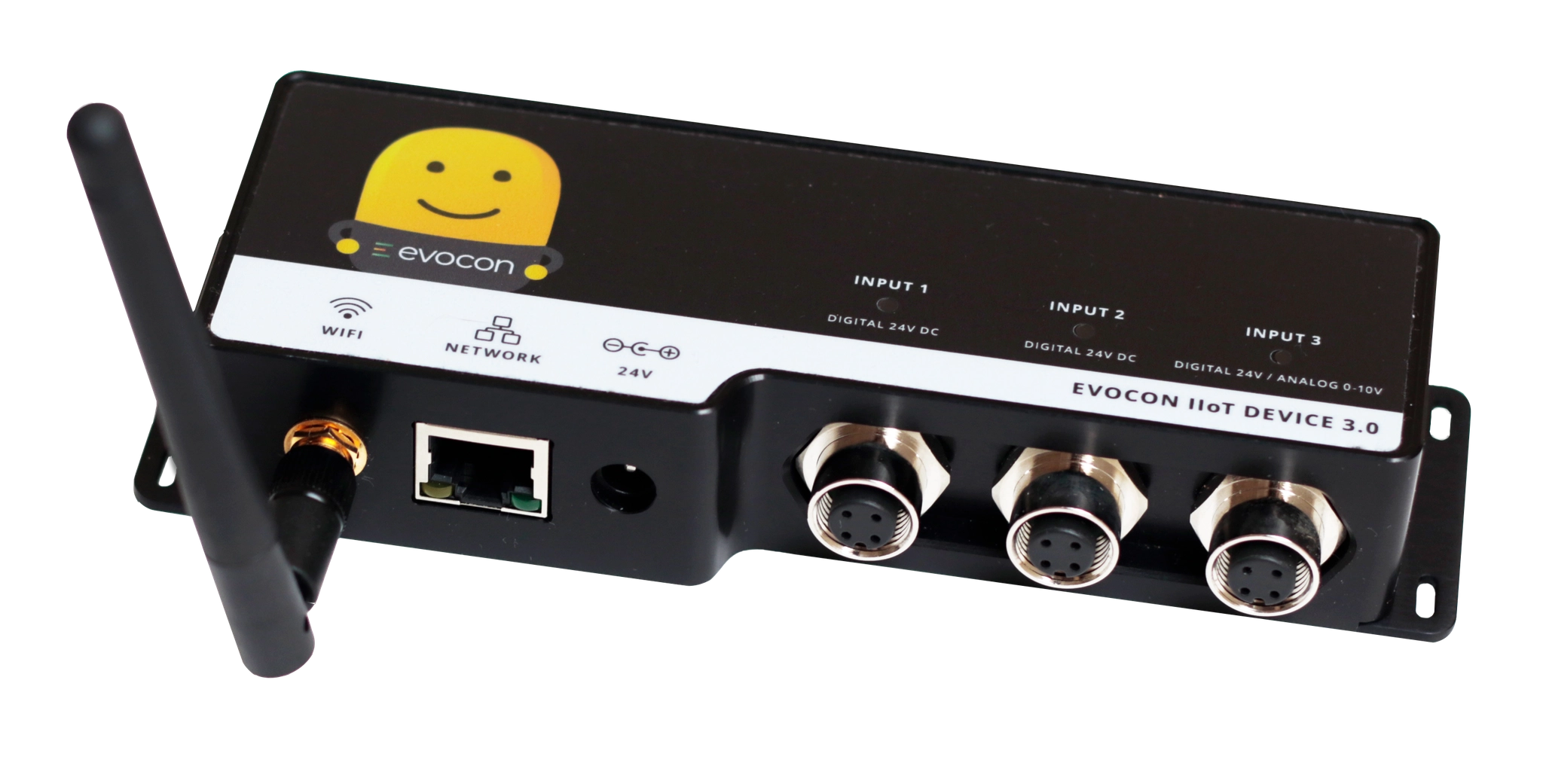
Evocon device 3
Network connectivity
Evocon is a cloud-based solution. Evocon IIoT device that registers production needs access to the Internet. Access from the Internet towards the device is not required and should be blocked using a firewall. Below is a document that explains how the device communicates in the network.
Hardware - Evocon IIoT device 3 - Networking configurations and capabilities
Ethernet Port lights
Yellow light next to the Ethernet connector is a status light for physical link and (cable connected). Blinking indicates data flow when Ethernet cable is connected.
Green status light is located next to the Ethernet connector. The green status light turns on when the device is powered and starts blinking once the device has connectivity to the cloud server. Configuring the device
Evocon devices are usually set up with the correct configuration before being sent to the customer. Once they are online, Evocon support is able to configure the device.
The devices also have a command line interface and WiFi interface that can be used to change the basic configurations on site.
Hardware - Evocon IIoT device 3 - Command line interface (CLI) Hardware - Evocon IIoT device 3 - Interface to configure IP and WiFi settings
Sensors and signals
All Evocon device inputs are 24V DC digital inputs. The M12 connectors use standard A-type industrial automation wiring pinout. PNP-type 24V DC industrial sensors can be connected to an Evocon device.
Pinout of the M12 connectors for digital signal:
| Pinnumber | Pincolor | Pinelectricalconnectiondescription |
|---|---|---|
| 1 | Brown | +24Vofdevicepowersupply |
| 2 | White | Notconnected |
| 3 | Blue | 0V ( -) of device power supply Or 0V ( -) of the input circuit if the ground . connectionjumperisremovedfrominsidethedevice . |
| 4 | Black | 24V (+) optically isolated input Counts on falling edge (24V -> 0V) . |
Pinout of the M12 connector of Input 3 for analog signal connection:
| Pinnumber | Pincolor | Pinelectricalconnectiondescription |
|---|---|---|
| 1 | Brown | Notconnected |
| 2 | White | Notconnected |
| 3 | Blue | 0Vofanalogvoltage |
| 4 | Black | 0 -10V analog voltage |
To make the installation as fast and easy as possible, we keep stock and can supply sensors that are proven to work well in different production environments. We can also supply sensor cables in lengths of 5m, 10m or 25m. If a longer cable is required, we can provide a pair of M12 connectors and you can buy a 3-wire locally. In this case, we suggest you use a 3-wire cable with 0.34...0.5 mm2 cross-section up to 100 meters in length.
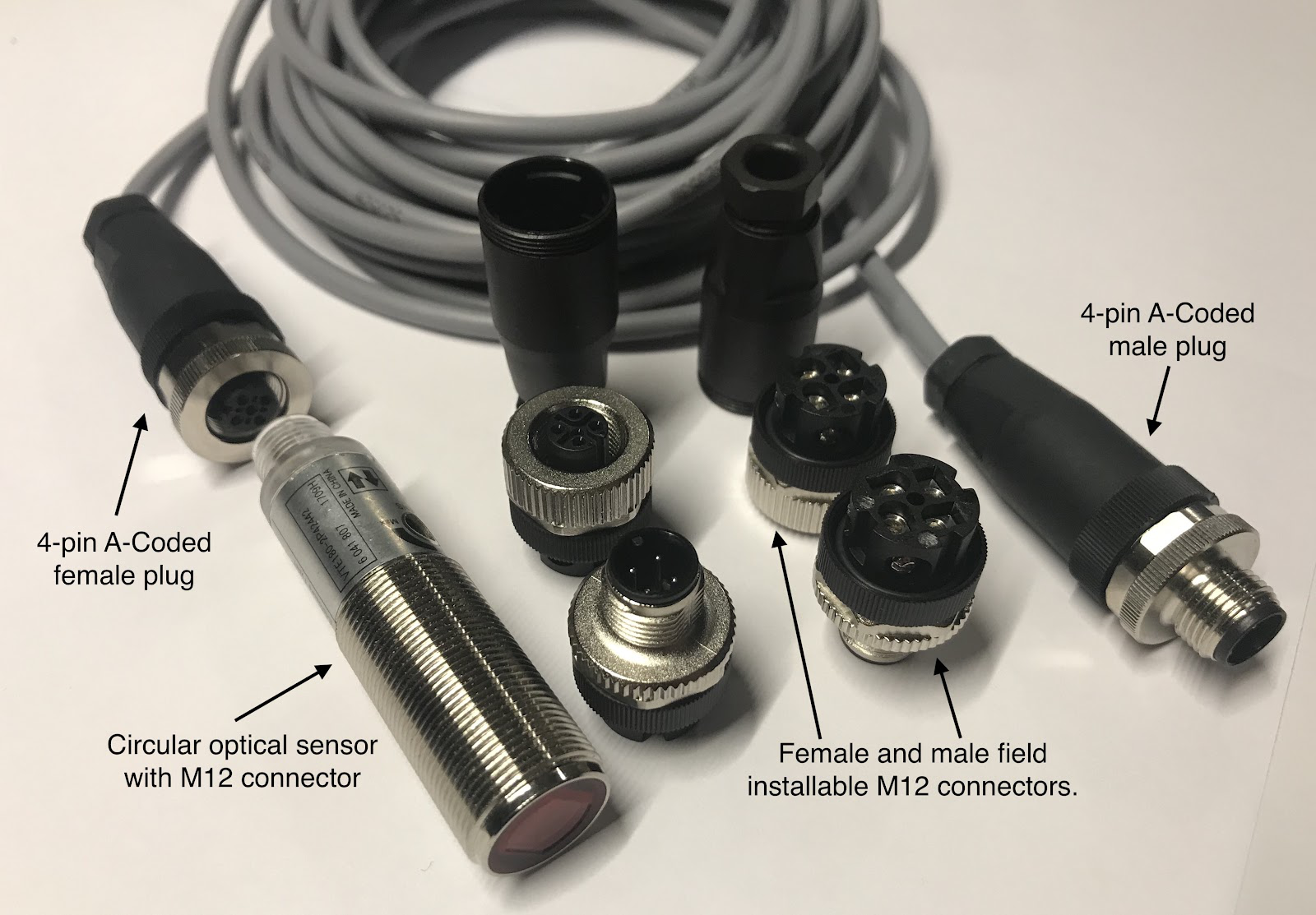
You can also connect a relay to Evocon device to copy an existing signal. Below are guides for connecting different signals.
Hardware - Evocon IIoT device 3 - How to connect a relay Hardware - Evocon IIoT device 3 - How to connect a sensor Hardware - Evocon IIoT device 3 - How to connect an analog signal
Hardware - Evocon IIoT device 3 - Signal connection drawings
It is possible to connect Evocon input straight to PLC output. There are jumpers inside the Evocon device 3 that can be removed to isolate input 0V from device 0V fully.
Sensors stocked and supplied by Evocon
Although most off-the-shelf industrial sensors work with the Evocon device, we have gathered below a list of sensors that we stock and suggest for our customers. Optical sensor with reflector for standard installations, detecting objects in a wide range of conditions. IP69K option available for wet conditions.
Product characteristics Type of light red light Housing rectangular Dimensions [mm] 35.4 x 13 x 21 Application System polarization filter
https://www.ifm.com/us/en/product/O6P200
Optical sensor for detecting objects in small spaces and at short distances.
All information about the O7H204 at a glance. We assist you with your requirements. ✓ Technical data ✓ Mounting and Installation Instructions ✓
https://www.ifm.com/us/en/product/O7H204
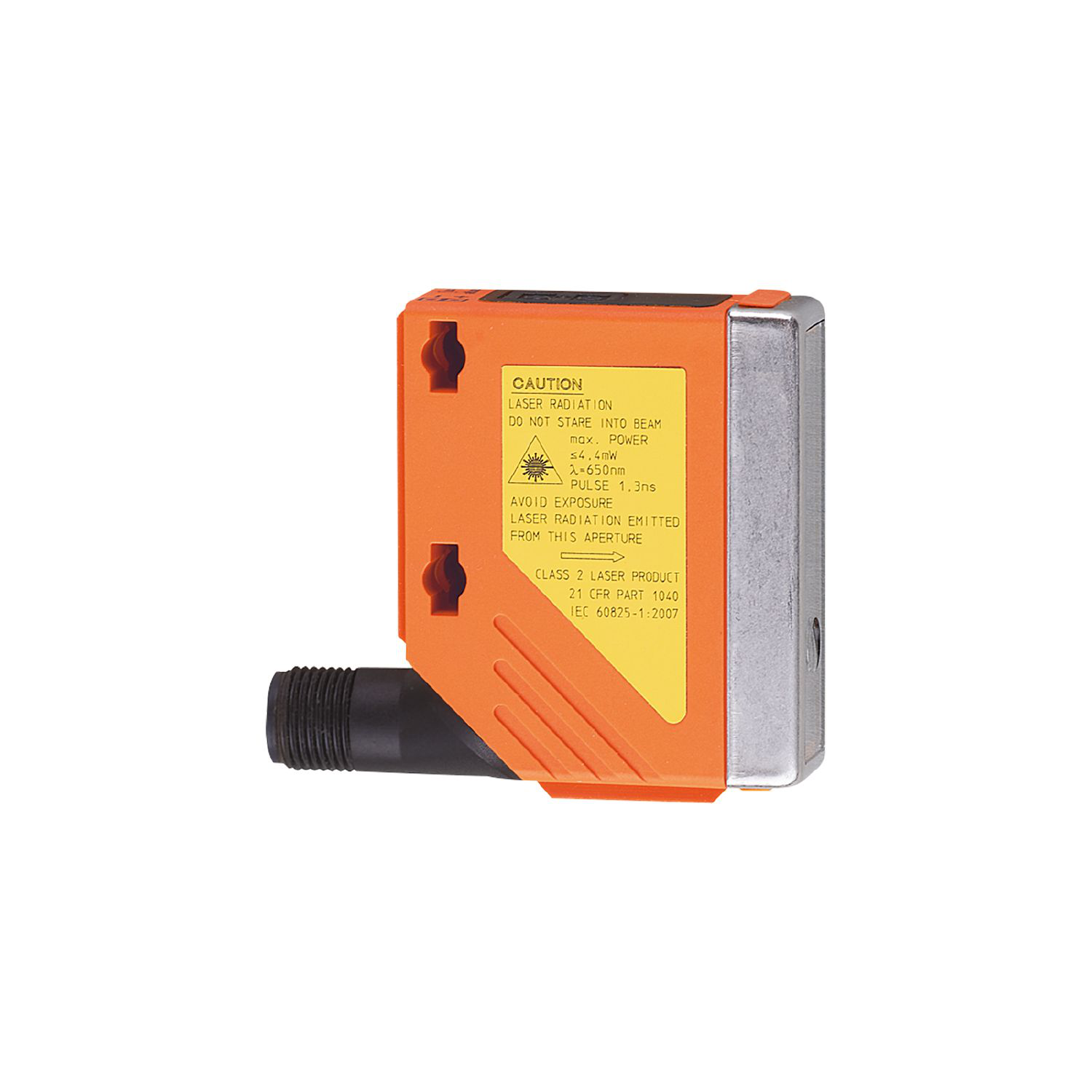
Laser sensor for detection of objects at a precise distance or range.
Very long range due to time-of-flight measurement, Reliable background suppression and colour-independent detection, With display and
https://www.ifm.com/ee/en/product/O5D100
Solid state relay module for interfacing with 24V digital signals
Solid-state relay module - RIF-0-OPT-24DC/48DC/100 - 2905294
The pluggable electromechanical and solid-state relays in the RIFLINE complete product range and the base are recognized and approved in
https://www.phoenixcontact.com/online/portal/us?uri=pxc-oc-item…
Measuring wheel set

DBV50E-22ELA0010 | Encoders | SICK
Dimensional drawing 63.5 mm spring arm, encoder on mounting side (left), single wheel Attachment specifications Diagrams Force deflection chart
https://www.sick.com/fi/en/encoders/measuring-wheel-encoders/d…
Maintenance, repair and disposal The operation of Evocon IIoT device 3 is maintenance-free. It is not possible to repair the device. Dispose of the device in an environmentally friendly way in accordance with the applicable national regulations or send it back to Evocon for appropriate disposal when it is no longer used.
Installation
Environmental Requirements (Water & Dust Protection) To ensure the longevity and safe operation of this device, it must be installed in a location or enclosure that provides adequate protection against environmental factors.
-
Enclosure Rating: If installed outdoors or in industrial environments, the device must be housed in an enclosure rated at least IP65 (or NEMA 4) to prevent the ingress of dust and direct water jets.
-
Mounting Location: Avoid installing the device in areas where it may be submerged in water or subjected to high-pressure washdowns unless a higher-rated enclosure (IP67/IP68) is used.
RF Exposure Compliance (Safety Distance) To comply with CE/FCC radio frequency (RF) exposure limits, this device must be installed to maintain a separation distance from all persons.
- Minimum Distance: Install the device such that a minimum separation distance of 20 cm (8 inches) is maintained between the radiator (antenna) and the body of any user or nearby person at all times.
Enclosure Material & Connectivity